Comprehensive MariaDB Backup & Restore Guide
 NeeRoz M
Comprehensive MariaDB Backup & Restore Guide


mariadb-backup is a high-performance, open-source tool for performing safe, non-blocking physical hot backups of MariaDB databases. This guide covers the complete implementation strategy for both Full and Incremental backup lifecycles.
Phase 1: Full Backup Strategy
A full backup serves as the foundation. It copies the entire database directory while keeping the server fully accessible to users.
1. Execute the Full Backup
Run this command to capture the initial snapshot of your database:
mariadb-backup --backup \
  --target-dir=/var/mariadb/backup/full_base \
  --user=backup_user \
  --password=your_password
Be careful when using this code.
| Flag | Purpose |
|---|---|
--backup |
Initiates the physical data copying process |
--target-dir |
The destination path. This folder must be empty or non-existent before running |
Phase 2: Incremental Backup Strategy
Incremental backups only copy data that has changed since a previous backup. This saves significant storage space and reduces backup times.
1. First Incremental Backup (inc_1)
To capture changes made after the initial full backup, point the base directory to your full backup folder:
mariadb-backup --backup \
  --target-dir=/var/mariadb/backup/inc_1 \
  --incremental-basedir=/var/mariadb/backup/full_base \
  --user=backup_user \
  --password=your_password
--incremental-basedirinstructs the tool to check the Log Sequence Number (LSN) of the full backup and extract only newer modifications.
2. Second Incremental Backup (inc_2)
To capture subsequent changes (e.g., the following day), chain this backup to your previous incremental backup (inc_1):
mariadb-backup --backup \
  --target-dir=/var/mariadb/backup/inc_2 \
  --incremental-basedir=/var/mariadb/backup/inc_1 \
  --user=backup_user \
  --password=your_password
Phase 3: The Prepare Phase (Merging Logs)
Before a physical backup can be restored, it must be prepared. For incremental strategies, this means merging the incremental deltas into the full backup folder to construct a single, cohesive timeline.
The Golden Rule
You must append the
--apply-log-onlyflag to every step except the final merge operation. This prevents the backup utility from rolling back incomplete transactions prematurely before all deltas are combined.
Step 1: Prepare the Base Full Backup
mariadb-backup --prepare --apply-log-only \
  --target-dir=/var/mariadb/backup/full_base
Step 2: Merge the First Incremental (inc_1)
mariadb-backup --prepare --apply-log-only \
  --target-dir=/var/mariadb/backup/full_base \
  --incremental-dir=/var/mariadb/backup/inc_1
Step 3: Merge the Final Incremental (inc_2)
Since inc_2 is the final point-in-time state we want to achieve, omit the --apply-log-only flag to allow the transaction log engine to completely clean and finalize the snapshot:
mariadb-backup --prepare \
  --target-dir=/var/mariadb/backup/full_base \
  --incremental-dir=/var/mariadb/backup/inc_2
At this point, /var/mariadb/backup/full_base is fully updated, verified, and ready for deployment.

Phase 4: Restoration Process
To recover a system, the active database instance must be temporarily stopped to allow file swaps.
1. Stop the Active Server Service
sudo systemctl stop mariadb
2. Purge the Active Data Directory
To avoid corruption from mixed files, clean out your current operational directory:
sudo rm -rf /var/lib/mysql/*
3. Copy Back the Restored Snapshot
mariadb-backup --copy-back \
  --target-dir=/var/mariadb/backup/full_base
--copy-backreads your database configuration files (my.cnf), detects your system’s data path (/var/lib/mysql), and migrates the prepared structure into place.
4. Correct Permissions & Initialize
Because backup tasks are typically managed by root systems, permissions must be explicitly reassigned to the database execution user daemon:
sudo chown -R mysql:mysql /var/lib/mysql
sudo systemctl start mariadb

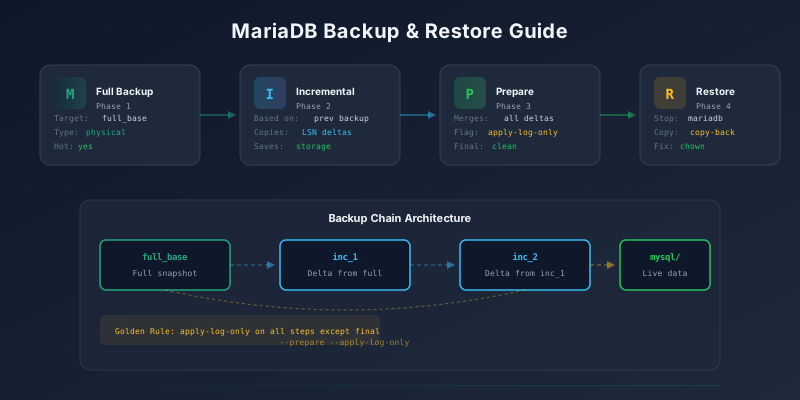
Backup Chain Architecture
┌──────────────┐    ┌──────────────┐    ┌──────────────┐    ┌──────────┐
│  full_base   │───▶│    inc_1     │───▶│    inc_2     │───▶│  mysql/  │
│  Full snap   │    │  Delta:full  │    │ Delta:inc_1  │    │ Live data│
└──────────────┘    └──────────────┘    └──────────────┘    └──────────┘
        │                                     │
        └───── merge with --apply-log-only ───┘
                         │
                    final prepare
                         │
                    ▼ clean snapshot
Useful Commands
| Command | Purpose |
|---|---|
mariadb-backup --backup --target-dir=... |
Create a backup |
mariadb-backup --prepare --target-dir=... |
Prepare a backup for restore |
mariadb-backup --prepare --apply-log-only --target-dir=... |
Prepare without finalizing (for chaining) |
mariadb-backup --copy-back --target-dir=... |
Restore backup to data directory |
mariadb-backup --move-back --target-dir=... |
Move instead of copy (saves disk) |
mariadb-backup --incremental-basedir=... |
Base directory for incremental comparison |
Conclusion
With mariadb-backup, you get a robust, non-blocking backup strategy that keeps your MariaDB server online during backups. The full + incremental approach minimizes storage usage while maintaining point-in-time recovery capability. Always test your backup restoration process regularly to ensure your data can be recovered when needed.
Table of Contents