Redis Master-Replica Setup on Ubuntu 24.04
 NeeRoz M
Redis Master-Replica Setup on Ubuntu 24.04


Redis is an in-memory data store used as a database, cache, and message broker. In this guide, we will set up a master-replica replication between two Ubuntu 24.04 servers for high availability and read scaling.
Redis now generally uses the term primary/replica. “Master/slave” is still commonly seen in configuration and documentation.
Server Details
| Role | Hostname | IP |
|---|---|---|
| Master | redis-master | 192.168.1.101 |
| Replica | redis-slave | 192.168.1.102 |
1. Configure Hostnames
Master — 192.168.1.101:
sudo hostnamectl set-hostname redis-master
Slave — 192.168.1.102:
sudo hostnamectl set-hostname redis-slave
Verify:
hostname
2. Configure /etc/hosts
On both servers:
sudo nano /etc/hosts
Add:
192.168.1.101 redis-master
192.168.1.102 redis-slave
Test connectivity:
From Master:
ping -c 3 redis-slave
From Slave:
ping -c 3 redis-master
Both should work.

3. Install Redis
Run on both servers:
sudo apt update
sudo apt install redis-server -y
Check Redis version:
redis-server --version
Check service:
sudo systemctl status redis-server
You should see:
Active: active (running)
4. Configure Redis Master
On 192.168.1.101:
Open the Redis configuration:
sudo nano /etc/redis/redis.conf
Find:
bind 127.0.0.1 -::1
Change it to:
bind 0.0.0.0
For production, bind only to the required private interface/IP instead of
0.0.0.0.
Find:
protected-mode yes
Keep it as:
protected-mode yes
Find:
# requirepass foobared
For this lab, leave authentication disabled. For production, enable a strong password/ACL.
Save: Ctrl + O → Enter → Ctrl + X
Restart Redis:
sudo systemctl restart redis-server
Check:
sudo systemctl status redis-server

5. Test the Redis Master
On 192.168.1.101:
redis-cli
Run:
PING
Expected:
PONG
Create test data:
SET message "Hello from Redis Master"
Expected:
OK
Check it:
GET message
Expected:
"Hello from Redis Master"
Exit:
exit
6. Configure Redis Replica
Now go to 192.168.1.102:
sudo nano /etc/redis/redis.conf
Find:
bind 127.0.0.1 -::1
Change to:
bind 0.0.0.0
Then find the replica configuration. Depending on the Redis version, you may see:
# replicaof <masterip> <masterport>
Change it to:
replicaof 192.168.1.101 6379
Save: Ctrl + O → Enter → Ctrl + X
Restart Redis:
sudo systemctl restart redis-server
Check:
sudo systemctl status redis-server
7. Check Replica Status
On the replica:
redis-cli
Run:
INFO replication
Look for:
role:slave
master_host:192.168.1.101
master_port:6379
master_link_status:up
Depending on your Redis version,
rolemay be shown asrole:replica.
The important part is:
master_link_status:up
Exit:
exit

8. Test Replication
Now we’ll test whether data created on the master appears on the replica.
On Master
Connect:
redis-cli
Run:
SET username "admin"
Then:
GET username
Expected:
"admin"
On Replica
Connect to the replica:
redis-cli
Run:
GET username
Expected:
"admin"
Replication is working.

9. Test Automatic Data Replication
On the Master:
redis-cli
Run:
SET server "redis-master"
SET environment "testing"
SET application "my-app"
Then on the Replica:
redis-cli
Run:
GET server
GET environment
GET application
Expected:
"redis-master"
"testing"
"my-app"
10. Important: Replica Is Read-Only
By default, a Redis replica does not accept normal writes.
On the replica, try:
SET test "hello"
You should get an error:
READONLY You can't write against a read only replica.
This confirms that the replica is operating as a read-only replica.

11. Check Replication from the Master
On the master:
redis-cli INFO replication
You should see:
role:master
connected_slaves:1
slave0:ip=192.168.1.102,port=6379,state=online
On newer Redis versions, you may see
replica0terminology instead.
The important values are:
| Value | Expected |
|---|---|
| role | master |
| connected_slaves | 1 |
| state | online |
12. Configure Firewall
If UFW is enabled, allow Redis only from the replica.
On the Master:
sudo ufw allow from 192.168.1.102 to any port 6379 proto tcp
Check:
sudo ufw status
Do not expose Redis port 6379 to the public internet.

13. Test Network Connectivity
From the replica:
nc -zv 192.168.1.101 6379
Expected:
Connection to 192.168.1.101 6379 port [tcp/redis] succeeded!
If nc isn’t installed:
sudo apt install netcat-openbsd -y
14. Test Replication After Restart
Restart the master:
sudo systemctl restart redis-server
Wait a few seconds.
On the replica:
redis-cli INFO replication
Check:
master_link_status:up
Then test:
redis-cli GET username
The data should still be available.
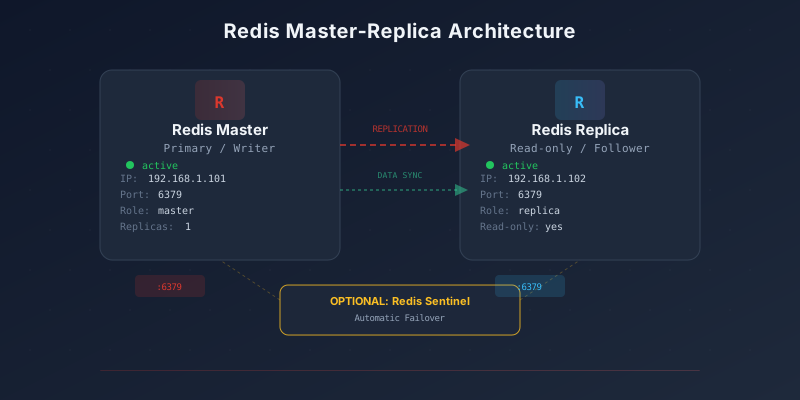
15. Important Limitation
With this setup:
Master (192.168.1.101)
    │
    ▼
Replica (192.168.1.102)
If the master goes down, the replica does not automatically become the master.
For automatic failover, you need Redis Sentinel.
The production architecture would look like:
                 Redis Sentinel
                       │
          ┌────────────┴────────────┐
          │                         │
          ▼                         ▼
   Redis Master              Redis Replica
   192.168.1.101             192.168.1.102
With Sentinel, if the master fails, Sentinel can promote the replica.

16. Useful Commands
| Command | Purpose |
|---|---|
sudo systemctl status redis-server |
Check Redis service |
sudo systemctl restart redis-server |
Restart Redis |
redis-server --version |
Check Redis version |
redis-cli PING |
Test Redis |
redis-cli INFO replication |
Check replication |
redis-cli INFO |
Check all Redis information |
redis-cli MONITOR |
Monitor Redis commands (Ctrl+C to stop) |
17. Final Architecture
┌──────────────────────────────┐
│       Redis Master           │
│                              │
│ IP: 192.168.1.101            │
│ Port: 6379                   │
│ Role: Master/Primary         │
└──────────────┬───────────────┘
               │
               │ Replication
               │
               ▼
┌──────────────────────────────┐
│       Redis Replica          │
│                              │
│ IP: 192.168.1.102            │
│ Port: 6379                   │
│ Role: Replica                │
│ Read-only                    │
└──────────────────────────────┘
Verification Checklist
- Redis installed on both servers
- Master running on 192.168.1.101
- Replica running on 192.168.1.102
- Replica connected to master
master_link_status:upconnected_slaves:1- Data replicated from master to replica
- Replica is read-only

Next recommended step: Add Redis Sentinel to these two servers (plus a third Sentinel node for reliable quorum). That gives you automatic master failover instead of just replication.
Conclusion
You have successfully set up Redis master-replica replication on Ubuntu 24.04. The replica continuously syncs data from the master and serves read requests, which helps scale read-heavy workloads. For production use, consider adding Redis Sentinel for automatic failover and enabling authentication for security.
Table of Contents